
Real Estate Master IIIx Calc
Calculated IndustriesBusiness
4.740.00 Reviews
- Version
- 10.4.13
- Installs
- 10.00K
- Age Rating
- Everyone
Screenshots


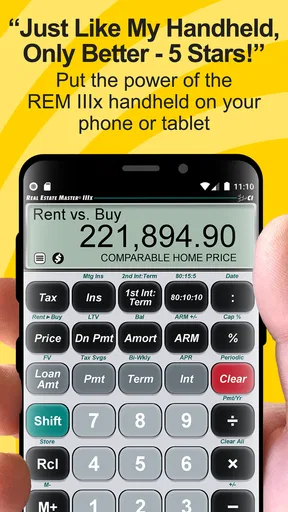
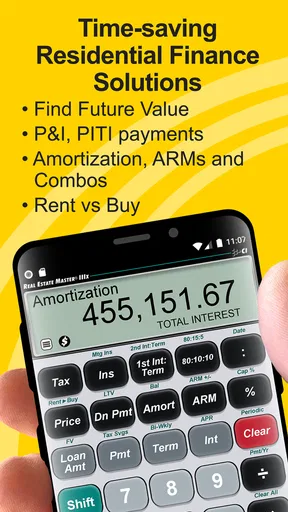
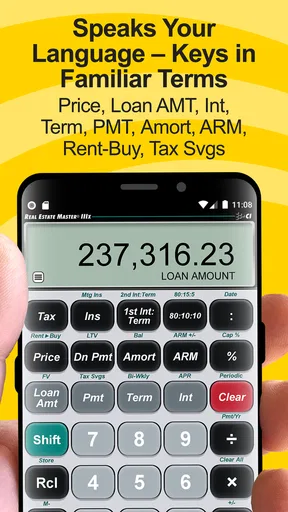


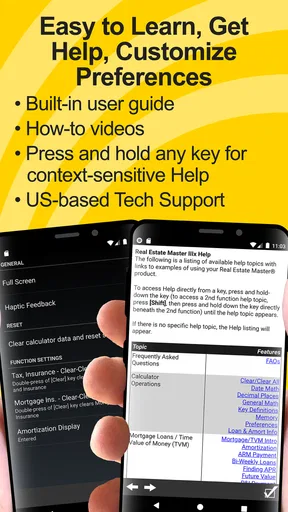
Our Review of Real Estate Master IIIx Calc
 Analysis by Appyee
When I look for a real estate finance calculator, I am not only asking whether it can produce a payment figure. I want to know whether it helps me make a decision during a conversation, compare financing choices without reaching for a spreadsheet, and explain the result clearly to someone who may not work with numbers every day. That is the standard I used with Real Estate Master IIIx Calc, a Business app from Calculated Industries.
My overall impression is that this is a focused tool for people who regularly deal with residential property finance. It is free to install, carries an Everyone age rating, and has built a solid reputation with a 4.7 average from more than two hundred ratings. Its audience is narrower than that of a general calculator, but that specialization is exactly what makes it useful when a mortgage, property price, loan term, or investment comparison is in front of you.
What to consider before choosing a real estate calculator
The first decision is whether you need a dedicated real estate calculator or simply a standard calculator with a few formulas saved somewhere. For occasional personal planning, a phone’s built-in calculator, a spreadsheet, or a general mortgage tool may be enough. Those options are often easier for a beginner because they show fewer inputs and require less familiarity with financial terminology.
I would choose this app when the calculation is part of a wider property discussion. A real estate agent, loan agent, investor, or property buyer may need to move between several scenarios quickly: changing the down payment, testing a different interest rate, checking the effect of a longer term, or comparing the financing impact of two homes. The advantage is not merely arithmetic speed. It is having a finance-oriented workspace ready when the question comes up.
There is also a practical difference between a calculator designed for a single answer and one intended for professional use. A single-answer tool may tell you an estimated monthly payment, while a specialized real estate calculator is more valuable when you need to examine how several variables interact. That distinction matters during a property viewing or client meeting, where waiting until later to rebuild the calculation can make the discussion less useful.
I would also think about how often you work away from a desk. A desktop spreadsheet is excellent for documenting assumptions and keeping a long record of scenarios. On a phone, however, I can respond immediately to a question instead of opening a workbook, finding the right tab, and checking whether an old formula still matches the situation. The trade-off is that a mobile calculator is better for live exploration than for maintaining a complete financial file.
My first impression of the workflow
The app feels like a professional instrument rather than a casual budgeting utility. That is good news if you already understand the basics of property finance. You can approach a question in terms of the numbers that matter to the transaction instead of translating everything into generic calculator operations first.
The same focus can create a learning curve. Someone who has never worked with loan calculations may not immediately know which figure belongs in each field or how to interpret the result. I would not treat the app as a replacement for learning what principal, interest, term, and payment assumptions mean. It can make the math faster, but the user still needs to understand whether the assumptions describe the deal accurately.
My most useful habit is to enter a scenario slowly the first time, then change only one assumption at a time. For example, I might keep the property price and loan term fixed while testing different interest rates. After that, I would return to the original scenario before changing the down payment. This simple discipline prevents a common mistake: believing a result changed because of one factor when several values were altered together.
Where the app is strongest
The clearest strength is specialization. Calculated Industries has built this app around residential real estate finance rather than trying to make one calculator serve every kind of business. That makes it a natural fit for people who need property and loan calculations often enough to value a dedicated tool.
In my experience, the best use is a live conversation. Imagine a buyer asking what happens if they put more money down. Instead of giving a vague answer or promising to calculate it later, I can adjust the relevant assumption and discuss the new result while the context is still fresh. The same workflow helps an agent compare properties that look similar on price but produce different financing outcomes.
A second strong use is screening. Before spending time building a detailed analysis, I can use the app to test whether a property is worth deeper attention. If a small change in the loan assumptions makes the payment uncomfortable, that is valuable information early in the process. It does not replace a full review, but it can prevent wasted effort.
A third, less obvious benefit is communication. Numbers are easier to explain when I can show how the result changes after one clear adjustment. A client may understand the effect of a different down payment more easily through a side-by-side conversation than through a long spreadsheet. The calculator becomes a teaching aid, not just a private arithmetic tool.
For loan agents, the value is similarly practical. A customer may arrive with a target payment rather than a target loan amount. Working backward through possible property and financing assumptions can make the discussion more concrete. I would still verify the final figures through the appropriate lending process, but the app is useful for turning an initial conversation into sensible scenarios.
Three habits that make it more useful
First, I would record the assumptions outside the app whenever a result matters. A calculator answer without the property price, rate, term, and other relevant context is difficult to audit later. Even a short note in a client file can prevent confusion when returning to the same scenario days afterward.
Second, I would use it for sensitivity checks rather than a single “correct” number. Try a slightly higher rate, a different down payment, or another term and watch how the outcome responds. This reveals whether the decision is robust or depends on an optimistic assumption. That is more valuable than treating one output as a promise.
Third, I would separate screening from documentation. Use the app to explore possibilities quickly, then move the selected scenario into the formal records, lender documents, or spreadsheet used for the transaction. This keeps the phone workflow fast without pretending that a quick calculation is the complete financial file.
These habits also address one of the app’s limitations. A dedicated calculator can encourage confidence because the result appears precise. Precision in the display does not guarantee precision in the assumptions. Taxes, insurance, fees, changing rates, lender rules, and individual circumstances can affect the real cost of a property. I see the app as a decision-support tool, not as a final approval authority.
Where another type of tool may fit better
A general mortgage app may be the better choice for a first-time buyer who wants a very simple guided experience. If the main question is “What might my payment be?” and the user does not need professional real estate workflows, a simpler interface may feel less intimidating. Real Estate Master IIIx Calc is more appealing when the user wants a specialized finance calculator and is comfortable taking responsibility for the inputs.
A spreadsheet is stronger when the goal is long-term analysis. I would choose a spreadsheet for a property portfolio, a record of many properties, custom assumptions, charts, notes, and collaboration. It is also easier to preserve a full audit trail there. The disadvantage is setup time and the risk of using a broken or outdated formula. This app is more convenient for a quick calculation, while a spreadsheet is better for a structured financial model.
A lender’s official calculator or quotation is preferable when the question concerns an actual offer. The lender’s figures may reflect terms, fees, eligibility rules, and assumptions that a general-purpose calculator cannot know from a few entries. I would use this app to prepare questions and compare scenarios, then rely on official documentation for the commitment.
For investment property analysis, the choice depends on the question. If I am examining the financing side of a residential purchase, this app can be a useful first pass. If I need detailed cash-flow projections, vacancy assumptions, operating expenses, tax treatment, renovation budgets, or a multi-year return model, I would move to a dedicated investment spreadsheet or property-analysis system. A loan calculator should not be stretched into a complete investment model.
There is also a usability trade-off between a professional calculator and a modern visual finance app. A visual app may offer friendlier explanations and charts, while this product’s appeal is its direct, calculation-centered approach. I would favor the visual alternative for teaching someone who is uncomfortable with finance. I would favor this one when speed and specialized input matter more than presentation.
What switching to it involves
The cost of switching is mostly mental rather than financial. The app itself is free, but in-app purchases range from forty-nine cents to twenty-four dollars and ninety-nine cents per item. That makes it sensible to install and evaluate before spending anything. I would first confirm that its workflow matches the calculations I actually perform, rather than assuming that a professional label automatically means it will fit my habits.
There is also a time cost in learning a specialized calculator. If I currently use a spreadsheet, I already know where my assumptions live and how I document them. Moving quick calculations to a phone can save time during conversations, but I still need a consistent method for transferring important results into my records. Without that habit, convenience can turn into scattered numbers and forgotten assumptions.
Compatibility is straightforward for many Android users: the current version is 10.4.13 and it requires Android 6.0 or later. That broad requirement makes it accessible on a range of devices, although I would still check the phone’s screen and input comfort before relying on it during busy appointments. A calculator can be technically compatible and still feel awkward if the display is cramped or the user is entering figures while talking.
The app has been available since August 6, 2012, and its current presence includes more than ten thousand installs. I read that as evidence of a sustained niche audience rather than a mass-market consumer product. Its 239 ratings and 40 reviews also suggest that it is used by a defined group of people who find value in this kind of tool, though I would still judge it by my own workflow instead of popularity alone.
Because the age rating is Everyone, the app does not present itself as restricted to professional adults. That does not mean every calculation is beginner-friendly. A teenager learning about mortgages could use it with guidance, but a new buyer should not confuse an accessible app with financial advice. Understanding the result remains more important than obtaining it quickly.
Who should use it, and who should skip it
I recommend it most strongly to residential real estate agents, loan agents, property buyers who compare financing options, and people who repeatedly answer property-payment questions. It is also useful for someone who dislikes rebuilding the same formulas in a spreadsheet every time a price or loan assumption changes.
I would be more cautious if you only need one mortgage estimate. In that case, a simpler calculator may be easier to understand and quicker to learn. I would also skip it as my primary tool if I needed collaborative records, detailed investment forecasting, or formal lender documentation. Those jobs call for a spreadsheet, official lender material, or a more complete property-analysis platform.
My recommendation is therefore conditional but clear: choose Real Estate Master IIIx Calc when you want a dedicated mobile companion for residential real estate finance, especially during fast-moving conversations. Use it with written assumptions, test more than one scenario, and verify important results through official sources. If you want a guided beginner experience or a complete investment model, another category of tool will serve you better.
After using it as a decision aid rather than treating it as a financial authority, I find the app easy to justify for its intended audience. It does not need to replace every calculator, spreadsheet, or lender document. Its job is narrower and more useful: helping me explore property and loan scenarios at the moment a real question appears. For agents and finance-focused property users, that focus is the reason I would recommend giving it a try.
Verdict
Strengths of Real Estate Master IIIx Calc
- Fast calculations for common real estate financing scenarios.
- Useful for comparing loan terms, payments, and investment options.
- Compact interface works well for quick on-site property checks.
- Suitable for professionals, students, and real estate investors.
- Helps reduce manual calculation errors during property analysis.
Limitations of Real Estate Master IIIx Calc
- Advanced features may take time to understand without documentation.
- Results depend entirely on accurate user-entered figures.
- Interface may feel dated compared with newer finance apps.
- Not a replacement for legal, tax, or professional financial advice.
- Some users may find the calculator-focused design too limited.
Other Releases by Calculated Industries
View All
Construction Master 5 Calc
Tools4.7

Construction Master Pro Calc
Tools4.7

Pipe Trades Pro Calculator
Tools4.8

Qualifier Plus IIIx
Business4.8
Similar Picks in This Category
View All
LinkedIn: Community & Network
LinkedIn3.8

Zoom Workplace
zoom.com4.1

Microsoft Teams
Microsoft Corporation4.6

Meta Business Suite
Meta Platforms, Inc.4.6

Webex Meetings
Cisco Systems, Inc.4.5

TeamViewer Remote Control
TeamViewer4.4
Frequently Asked Questions
What is Real Estate Master IIIx Calc used for?
Real Estate Master IIIx Calc is a specialized financial calculator designed for real estate professionals, investors, students, and anyone analyzing property deals. It can help evaluate mortgages, loan payments, cash flow, investment returns, property values, and other real-estate calculations. It is more focused on practical financial analysis than on browsing listings or managing properties.
Is Real Estate Master IIIx Calc suitable for beginners?
The app can be useful for beginners, but it is primarily aimed at users who understand basic real-estate and finance terminology. New users may need to learn concepts such as present value, internal rate of return, amortization, capitalization rates, and cash-on-cash returns before they can use every function confidently. Its value increases when used alongside a finance guide or professional instruction.
Does Real Estate Master IIIx Calc replace advice from a real-estate or financial professional?
No. Real Estate Master IIIx Calc provides calculations based on the information entered by the user, but it does not verify property documents, market conditions, tax rules, lending requirements, or investment risks. Results should be treated as estimates for analysis and comparison. Before making a purchase, loan, or investment decision, users should confirm the figures with a qualified real-estate, tax, lending, or financial professional.
What information do I need before using the calculator?
The required inputs depend on the calculation you want to perform, but you may need figures such as purchase price, down payment, loan amount, interest rate, loan term, rental income, operating expenses, vacancy assumptions, taxes, insurance, and expected sale price. Preparing accurate numbers in advance makes the results more useful. Incomplete or unrealistic inputs can produce misleading conclusions.
Is Real Estate Master IIIx Calc worth downloading for occasional property analysis?
It can be worthwhile if you occasionally compare mortgage options, study investment properties, or need a dedicated tool for real-estate calculations. However, users looking only for property listings, home-buying advice, or a simple loan calculator may find it more specialized than necessary. Before downloading, consider whether you need its broader analytical functions and whether its interface matches your experience level.
